2 Months with Sprint’s HTC Touch Pro 2

If you recall last year I posted a few Tweets about the, then upcoming, Palm Pre and how much I was looking forward to this phone.  Later on I posted a story about about my impressions with the Palm Pre.  After a few months of sticking with it and really giving it a try I had to let it go and go back to Windows Mobile.  Yes, I am a Microsoft slave when it comes to phones.  I missed the integration with Exchange, I missed the seamless connectivity with Outlook, I missed being able to tweak it to try and make it far more efficient and faster.

It now has been around two months since I’ve made the switch and I can’t really complain, I got everything I expected from Windows Mobile.  First, let’s start with the phone.

The HTC Touch Pro 2 retails for $599.99 at Sprint.com.  Yes, that’s $600 dollars for a phone!  Yes, I thought it was insane when I saw the price tag.  Not only is/was the phone incredibly pricey, it was close to impossible to find it at Sprint stores.  The excuse I always got was that since it was so pricey not a lot of stores carried it and it was considered a specialty item.  Good thing I didn’t ask for diamond encrusted keys.  Regardless, I turned to my trusted friend Craig Newman and his awesome website http://craigslist.org/ and found someone letting go of their phone for $250.  Finding the guy, haggling with him, and finally getting the phone is a whole other story, but ultimately I paid the asking price and began my journey back to the dark side.

Happy with my purchase I decided that this phone had so much potential, which was being thrown away by the stock operating system provided by Sprint.  First and foremost, there was Windows 6.5 and the phone runs Windows 6 stock.  Second, there was HTC’s Sense UI, among other tweaks available which would put this phone over the top when it came to usability.

When it comes to hacking your phone and making it do things it might not be supposed to do, you head over to the always awesome and informative, http://forum.ppcgeeks.com/.  After a few days of research I decided to give Mike and his http://www.mightyrom.com/ a spin.  Flashing your phone is not for the faint of heart, I was pretty nervous something would happen in the middle of the flash which would render my phone useless, but thankfully everything has been great so far and I’ve enjoyed what my phone has become.

The key features I love about this phone:

– Great voice quality, including the speaker.

– A keyboard, I love having a physical keyboard.

– Very responsive, more than my Palm Pre.

Cons:

– This thing is a brick, it’s huge.

– It’s Windows, which needs a kick to restart it ever few days… well maybe about once every two weeks.

– Windows Marketplace sucks.

~david
Sprint Everything Plan (or How Sprint Enabled My Addiction

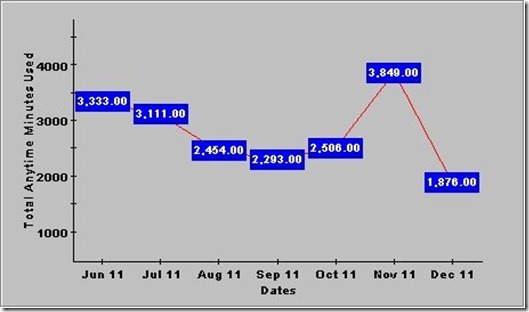
In case you remember my post from last year about my recent switch to Sprint Everything Plan, I wanted to provide a small updated on how my cell phone usage has increased.

SprintMinutesUsed


If you compare my usage from the year before I’m averaging around 1000 more minutes per month.  Now, at the end I’m getting a cheaper price/minute, however I sometimes worry about how much radiation I’m exposing myself to… oh well, just wanted to post something interesting and let me people know I’m still alive and kicking.

~david

Wireshark Portable 1.2.1 Rev 29141 Start Error

Here’s an annoying runtime error I just ran into using Wireshark Portable.

WSStartupError


Looking at this Wireshark bug ID shows a possible solution:

1) copy WiresharkPortable\Other\PortableSource\WiresharkPortable.ini  to
WiresharkPortable\WiresharkPortable.ini
2) edit WiresharkPortable\WiresharkPortable.ini and change the line:

WinPcapInstaller=WinPcap_4_0_2.exe

to

WinPcapInstaller=WinPcap_4_1_beta5.exe

However, the INI file mentioned above already has the correct beta5.exe WinPcap line. However, just moving the INI file to the WiresharkPortable folder did the trick.

~david
 

David get’s a silver badge

I try to stay involved with Cisco’s forum as to try to give back to the community a bit as well as trying to get some knowledge from the masses.  While I’m not a know it all it’s nice to have a little bit of recognition.  Last week i went from Bronze to Silver, which based on points others award you for the answers you provide. :-)

BadgesI have a long way to go before getting those 25k points… wonder if I could turn them in for cool Cisco gear?
~david

The Palm Pre – Five Days Later

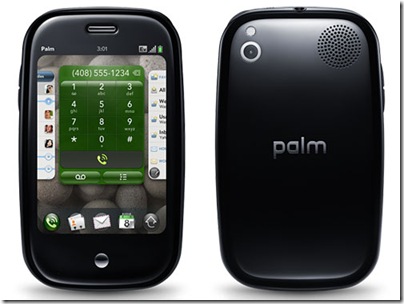
As many of you might know, I was an early adopter of Sprint’s Palm Pre here are some of my initial impressions.

palm pre

  1. It’s a completely new way of navigating and getting around to different menus.  You’ll either spend all your time running your finger across the bottom or figuring out how close to the corner to tap to bring up preferences.
  2. The screen is amazing and very responsive.
  3. Integration with Exchange is great, the only thing I’ve not found is how to edit meeting invitations acceptances or rejections.
  4. Setting up your initial contacts is a pain as it imports the contacts from every account which you set up.  I manage my contacts through Exchange and had to delete all of the Gmail contacts.
  5. The keyboard is rather small, but really shouldn’t be a huge issues unless you have monster paws.
  6. No T9 or similar program to auto guess what you’re trying to type.  You have to do it the old fashion way and type out the whole thing.
  7. When browsing the web and you zoom in and click on a link the page goes back to it’s tiny view and you have to zoom in again.  It would be ideal if once you zoomed in, all subsequent pages were zoomed in too.
  8. Palm decided to have a tiny little cap over the charging port.  I’m awaiting the days for this cap to fall of or be ripped out by accident.
  9. Palm didn’t really use a standard Micro-USB port.  I have 4 of these chargers and they are now only good for my GPS.  Thank you Palm for having me have to carry just another charger.
  10. Alarm clock will go off on the weekends even though it’s set for weekdays only.  Sprint acknowledged this bug and said an update should be out by the end of the first week of the Pre’s release.

That’s what I have so far.

~dmacias

Windows Live Writer WordPress Editor

It has been some months that I’ve been working on trying out different offline WP editors. I was getting tired on having to be online in order to add new stories. After much searching and much trial and error on stumbled upon Microsoft’s Windows Live Writer. I have to honest, I figured since it was Microsoft’s and it had the whole "Live" tag with it, that it would somehow be tied to MS Messenger, Hotmail, etc. However, that’s not the case, it is completely stand alone and a great tool. Per it’s Wikipedia page it supports:

  • Windows Live Spaces
  • SharePoint blogs
  • Blogger
  • LiveJournal
  • TypePad
  • WordPress

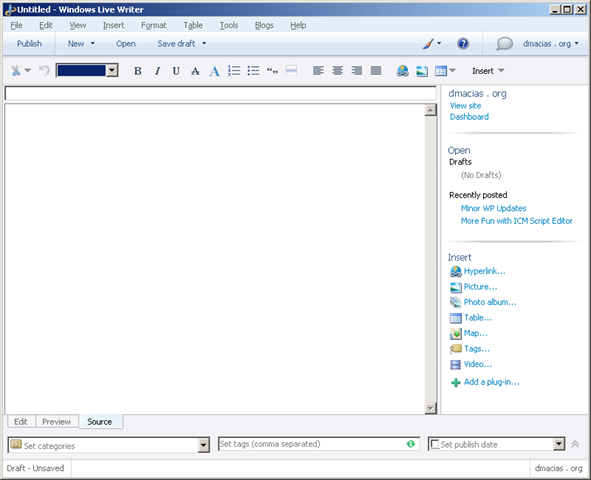
Needless to say you should see a bit better formatting on my posts. Here’s a quick screen shot of the UI.

WindowsLiveWriter


Notice the Edit, Preview, and Source buttons at the bottom of the main window, this allows you to quickly switch to different views and thus modify your page accordingly.

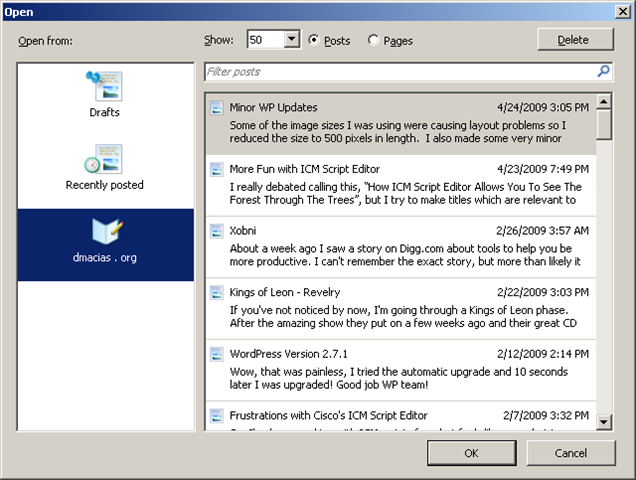
Another thing I love is how you can open any currently posted article and edit it very quickly.

WLWOpen 


Ultimately, I’m extremely happy with it.  It’s fast, has a very small memory footprint and it has a lot of plugins.

~david

More Fun with ICM Script Editor

I really debated calling this, “How ICM Script Editor Allows You To See The Forest Through The Trees”, but I try to make titles which are relevant to my post.  Regardless, here is my latest fun encounter with Script Editor.

I was working on a script, which all of a sudden didn’t work as it originally did.  I checked the ToD routing logic, it was right.  I checked the admin scripts, they were right.  I checked every single node leading up to that step and they were all right.  I had two co-workers check it for me and they could not find the error either.

This is a small example of what I was looking at:

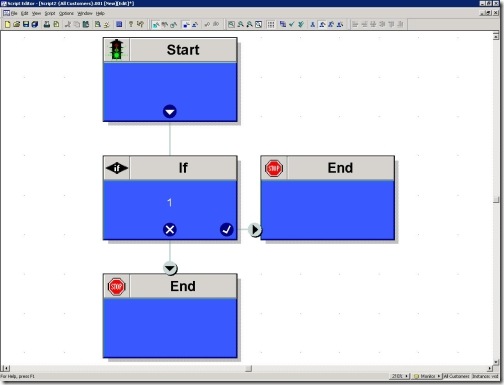
Script Editor Wrong

Now, in the above example it should be really apparent what is wrong, if you haven’t caught it, I’ll let you see what a correct script would look like:

Script Editor Right

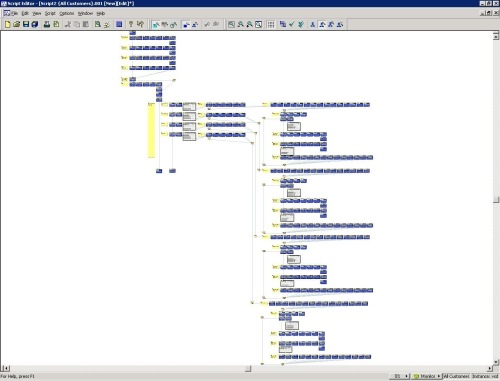
Yep, no connection to the If node.  Now, you’re probably thinking, what is this guys thinking, that’s so easy to spot.  You’re right it is easy to spot when you have 4 nodes, but when you’re script spans multiple pages and has hundreds of nodes, it’s a little harder and honestly after starting at a script like this for weeks

Lost


you become crossed-eyed.

~dmacias

Xobni

About a week ago I saw a story on Digg.com about tools to help you be more productive. I can’t remember the exact story, but more than likely it was from LifeHacker. Regardless, this story talked about this little California company who has created a plugin for Microsoft Outlook call Xobni. I’ve been test driving this for a week and let me tell you that I’m in love. Searching for emails is a breeze, what would take 10-15 minutes to finds, you’ll find it in under 3. Trying to find obscure emails is a breeze and being able to find any sort of conversation for any one contact is great.

The installation was quick and the indexing took a few hours, depending on how much email you have. The only draw back, which makes sense, is that you have to have the PST open in order for it to be indexed. It would be great for Xobni to index “offline” PST folders.

Lastly, Xobni comes with some pretty cool analytics. For example:

This is the mail traffic I’ve had today:
todays-summary


The email I’ve had in the last few months, which shows what happens when you get closer to production on a project:
montly-emails


And finally, a pretty interesting graph showing the time it takes you to respond to an email:
time-to-respond


I highly recommend this for all Outlook users.

~dmacias

Phishers use IVRs for phishing!

This week I received a text message from an “Unknown sender” and it read:

“This is an automated message from Franklin Bank.Your ATM card has been suspended.To reactivate call urgent at 866-545-2647”

Being the curious little monkey that I am, I just had to call it. So, the first thing I did was find a phone which did not display an external caller ID (ANI). After finding a phone I called the number above. I was greeted by an automated voice asking for my credit car number, my expiration number, and my 4 digit pin. I entered random information. After it was trying to verify my information, it asked for it again. However, this time it said it could not verify my account at this time and to call customer service representative… however it didn’t provide me with a number.

This is a scam, although I must say a some what ingenious scam. First, there’s an automated voice which answers the call, this can’t be tracked to any one person which might throw of a caller because of an accent or tone of voice. Second, is very similar to text messages received from various financial institutions. Finally, they have a toll free number which they provide for you to “activate you call”. Pretty cool, huh?

I think I’ll set something similar up at my home and even have it go to a web service to verify the credit card number is of the correct format just to say I can. :-)

~david