Category: WordPress

I’ve been bad at updating my site recently, but things have (like I always say) been busy.  However, I hope to come back with a bang.  I finally posted my marathon story and have updated WP to the latest version; 2.8.5.

Additionally, it has been 6 years since I first started my website.  October 13, 2003 to be exact.  Damn does time fly!  Every year I find it funny what my very first post says:

So things are starting pretty slow, expect very little until my life slows down some, or I miraculously discover that I can slow down time, or travel back in time…

~david
Enjoy!

As many as you know or notice on my site, I love Jeroen Smeets’s Last.fm Plugin.  Recently I had some issues with it not displaying correctly on my site.  A simple deletion of the plugin via the WP administration page and re-adding it again and we were back in business.  The new version of this plugin looks great!

~david

I use an excellent plugin to display my Last.fm recently listened to tracks.  You can find the plugin here.  After the upgrade to WP 2.8 I kept getting this error when trying to activate the plugin “The plugin does not have a valid header.”  After trying a few different things I ran into this post that actually makes sense.  Ultimately, if your plugin is contained within a two folders it will be a problem.  For example, plugins\lastfm-records\last.fm\ will create a problem, you need to remove the lastfm-records folder and keep everything within last.fm.


~david

It has been some months that I’ve been working on trying out different offline WP editors. I was getting tired on having to be online in order to add new stories. After much searching and much trial and error on stumbled upon Microsoft’s Windows Live Writer. I have to honest, I figured since it was Microsoft’s and it had the whole "Live" tag with it, that it would somehow be tied to MS Messenger, Hotmail, etc. However, that’s not the case, it is completely stand alone and a great tool. Per it’s Wikipedia page it supports:

  • Windows Live Spaces
  • SharePoint blogs
  • Blogger
  • LiveJournal
  • TypePad
  • WordPress

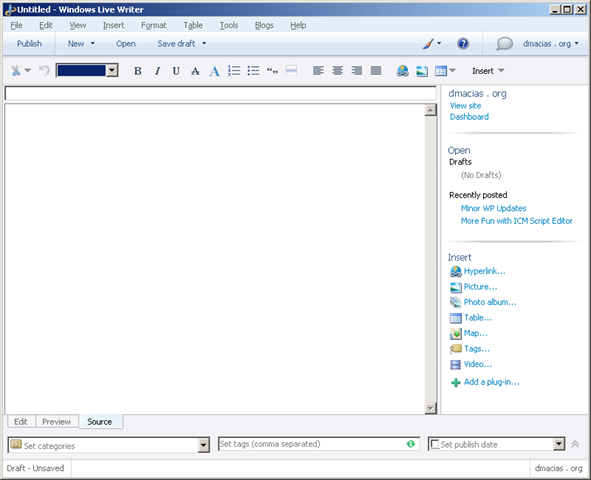
Needless to say you should see a bit better formatting on my posts. Here’s a quick screen shot of the UI.

WindowsLiveWriter


Notice the Edit, Preview, and Source buttons at the bottom of the main window, this allows you to quickly switch to different views and thus modify your page accordingly.

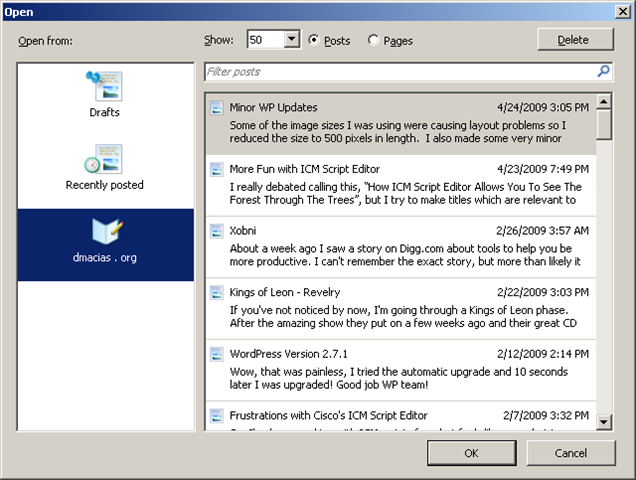
Another thing I love is how you can open any currently posted article and edit it very quickly.

WLWOpen 


Ultimately, I’m extremely happy with it.  It’s fast, has a very small memory footprint and it has a lot of plugins.

~david

Some of the image sizes I was using were causing layout problems so I reduced the size to 500 pixels in length.  I also made some very minor cosmetic changes to the theme I’m currently using… my site must feel so left out.

~dmacias

Wow, that was painless, I tried the automatic upgrade and 10 seconds later I was upgraded! Good job WP team!

~david

I had read about WP 2.7 a few weeks ago from Slashdot and had seen the changes made to the dashboard. I just installed and it’s night and day. Not sure exactly how I feel about it, but it does seem a bit more streamlined. Fortunately, all my plugins worked and for the most part the site looks the same. Enjoy the new changes.

~david

My one good deed for the day done. :-)

~david

I need to come up with an easier way to update WP, although it only take 10 minutes, it really could be streamlined.

~dmacias

avatar David Macias from the beautiful state of Texas and currently residing in Dallas. A place for ramblings, digressions, and the occasional insight into life, liberty, and the pursuit of happiness.