Google maps my location and the HTC Mogul 6800

Well, Google released version 2 of their mobile Google maps, you can find the download link here. Now, if you’re like me, a proud owner of the HTC 6800 with Sprint, you will be happy to know that this new software works great with this phone. It even seems to load a little faster. However, Google has a new feature called My Location, which uses cell tower triangulation to “find” your location. This seems to work for pretty much all other phones except for the HTC running Windows. Now, I’m still not sure if this is a HTC issue or a Sprint crippleware, but I’m working on it. However, if you’re curious why if this new feature works, the answer is no.

~david

12/05/2007 Update

So, there is still no working My Location in Google maps. However, take a look at this. The part of most interest is the following quote:

“Additionally, HTC is currently developing a separate ROM update which enables the EV-DO Rev. A and GPS capabilities that are already built into the Mogul hardware. Sprint and HTC plan to make this software ROM available in early 1Q 2008. Please bookmark this page for easy reference.”

Could this mean that the HTC Mogul will finally have true GPS capabilities?!? I sure hope so.
Spartanburg, SC and the changing of the leaves.

Had never been there before… actually had never been in South Carolina. I was there for the first time two weeks ago and while it had a lot of vegetation, it was nothing that really stood out in my mind. However, this past weekend was different. The trees had all sorts of colors. Red, yellow, brown. It was beautiful. There is a stretch out of GSP airport lined with tall trees on both sides and it was like something out of a book.

There’s not much to do in Spartanburg and I didn’t have a lot of time to do anything. However, I recommend this chicken place and this bbq place. I don’t remember the names, but I’m pretty sure there are not a lot of other options.

~david

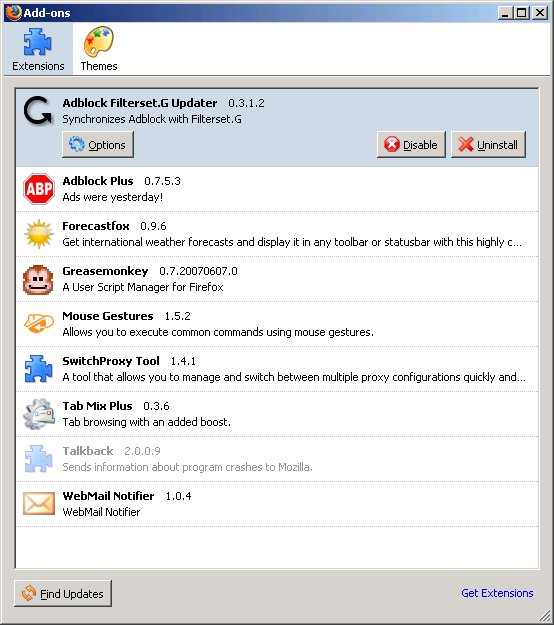
My Firefox Add-ons so far.

If you’re a Firefox user you should be very familiar with Add-ons. Here is a screen shot of the ones I use and absolutely love.

My Firefox add-ons

1. Adblock Filterset.G and Adblock Plus: These two add-ons make surfing an absolute pleasure. No ad splash screens, no huge banners, no AdSense, nothing. Yes, there is some questionable reasons for using this, but honestly some sites are just unbearable without these add-ons.

2. Forecastfox: When you’re on the road a lot, it is necessary to check the weather conditions of different places when booking travel. So, that’s where this add-on comes in to play. It takes two clicks to have instant weather updates or any city in your profile. And adding a new profile is quick and easy. Absolutely love it and use it a lot.

3. Greasemonkey: Google this add-on, this is a must for people who like to play around with the way some websites behave. The learning curve is steep, but once you’ve got it, it’s very easy.

4. Mouse Gestures: Being able to surf the web without moving your hand from the mouse make life so much simpler. You want to go back a page, right click, hold, and move mouse back. Reload page, right click, hold, up/down, etc.

5. SwitchProxy Too: My laptop ends up in multiple different networks, which all have different requirements when accessing the internet. Some times I need a proxy, some times I need a user name and password, SwitchProxy makes going from profile to profile quick and easy.

6. Tab Mix Plus: I usually have around 4-5 tabs open at any one time, this add-on allows me to configure how the tabs will function, how they close, how you can cntrl-tab over, etc.

7. WebMail Notifier: This add-on checks all of my email accounts and lets me know when there is email. currently I have it set to check Gmail, Yahoo, and Hotmail. Absolutely love it.

~david